My Prestalib App · Android & iOS with NFC

Library self-checkout.
Hold the phone close.

Your library’s app turns the student’s phone into the reader: hold it close to the item and the loan or return is recorded, with RFID security handled automatically. Android and iOS, branded for your university and compatible with most modern library management systems via SIP2.

RFID through the phone’s NFC reader · Automatic security handling · Languages included

MY PRESTALIB APPANDROID / iOS
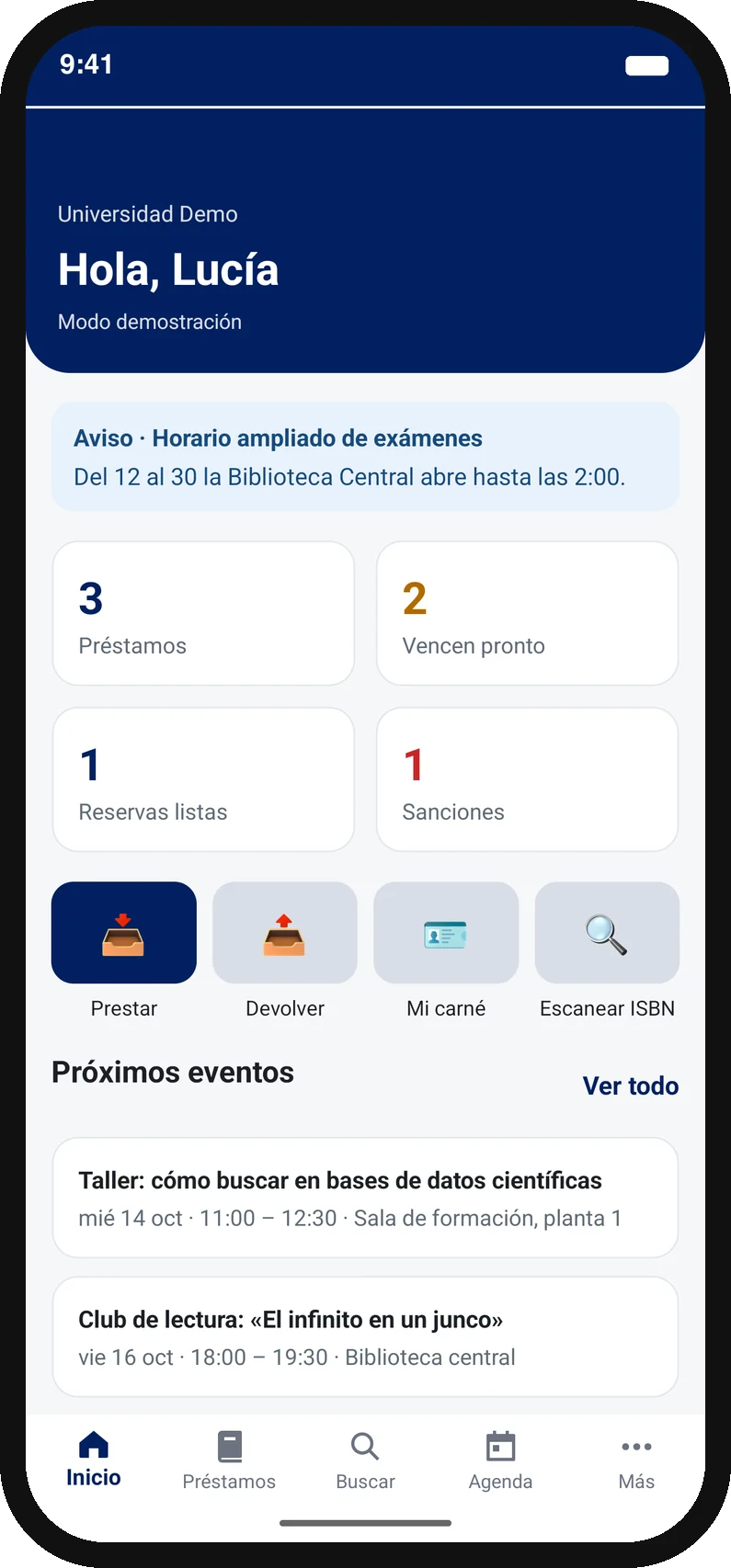
Prestalib app home screen: loans, notices and shortcuts to borrow and return
Their phone is
the RFID reader.
Example interface · Customisable for your library
01 Android & iOS02 Self-checkout & self-return03 Most modern library systems via SIP204 Nine languages included

Experience in
university libraries

IEEsadeUniversidad EuropeaExplore references →

Video · 80 seconds · English narration

See the whole app in under a minute and a half.

Sign-in, borrowing, the two-step return inside the library, the digital card and how it connects to your library system. No meeting needed.

Recorded in the “Biblioteca Prestalib” demo app; sample books and events are in Spanish. Each university gets its own app, with its branding and languages. Try the interactive demo · Free 30-day pilot with your own books

The phone is the RFID reader

It feels like magic.
It’s their phone’s NFC.

The reader travels with the user: the phone’s own NFC reads the item’s RFID tag, right at the shelf and on any floor. The app records the transaction in your library system and handles security automatically.

  1. 01

    Choose borrow or return.

    The user opens your library app on their phone and chooses the transaction.

  2. 02

    Hold the phone close to the item.

    The built-in NFC reader reads the book or library item’s RFID tag.

  3. 03

    Done. That simple.

    The loan or return is recorded and RFID security is handled automatically.

Returns always happen inside the library.

The app requires the user to be inside the library to complete a self-return. Once the return is recorded, they leave the item at the designated return point.

NFC reading requires a compatible phone and HF RFID tags: a phone’s NFC cannot read UHF tags. The app also identifies items by barcode with the camera, so in libraries without security gates it works without RFID.

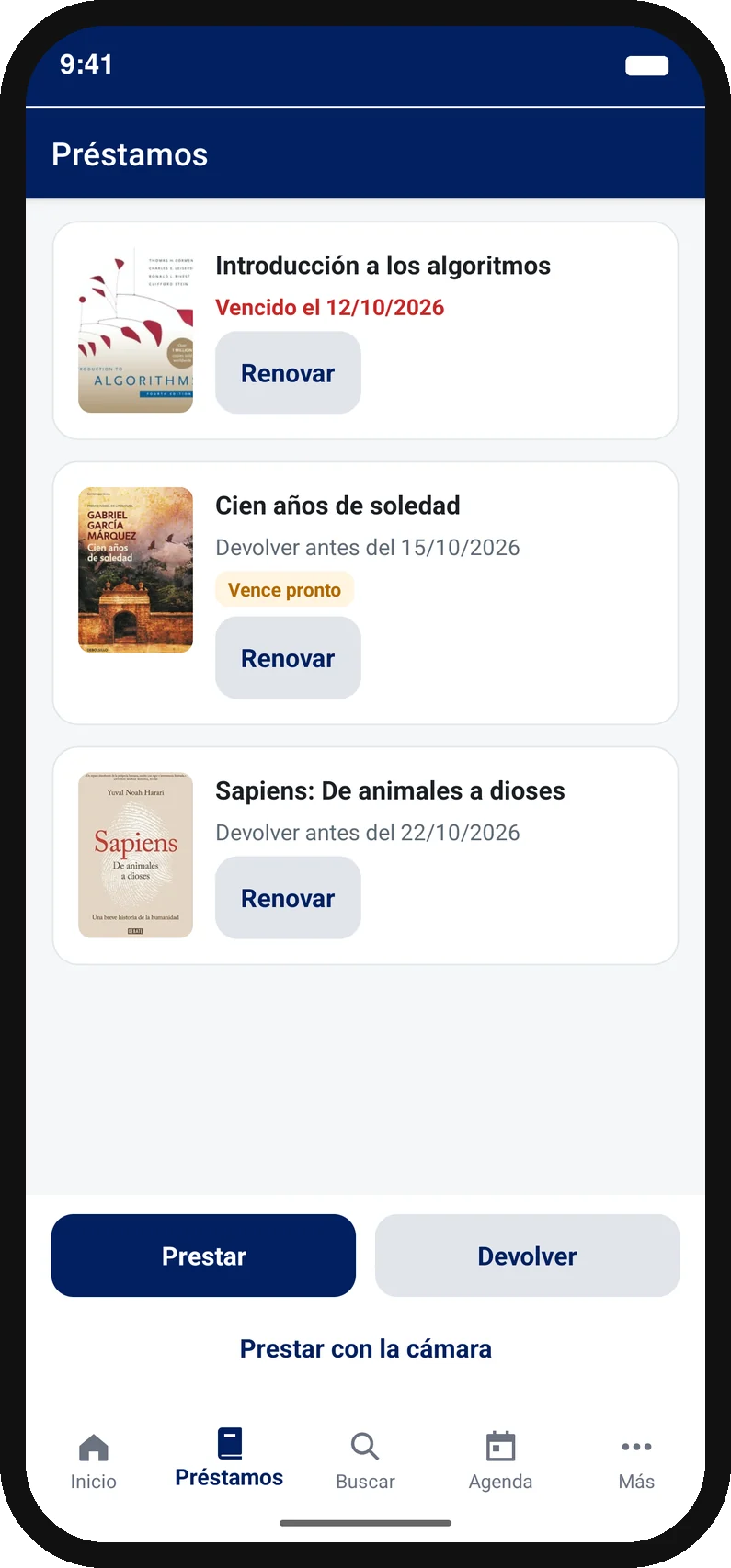
Active loans in the app, with renewals and borrow and return buttonsTHE LIBRARY, CLOSE AT HAND

One app. The services they need.

Their whole library.
Always at hand.

  • Borrowing & returnsUsing the phone’s NFC reader, with returns only inside the library.
  • Catalogue, holds & renewalsInformation and everyday tasks in one place.
  • RFID & securityItem reading and automatic RFID security handling.
Discover My Prestalib App →

This is one of Prestalib’s two solutions; the other is Prestalib Smartphones, on library-owned devices. If you are still weighing options, read our guide to library self-checkout.

Two solutions

Two ways to offer
self-checkout in your library.

The difference is who owns the device that reads the item. Both connect to your library management system, and many libraries offer both at once.

The user’s own phone

My Prestalib App

An Android and iOS app with your university’s branding. The student holds their phone close to the item and its NFC reads the RFID tag.

  • Borrowing and returns on any floor or site.
  • Catalogue, renewals, digital card and phone reminders.
  • No hardware to install and no floor space used.
Explore My Prestalib App

Library-owned devices

Prestalib Smartphones

Your library’s smartphones and tablets configured as shared self-service points, placed wherever you decide.

  • Users install nothing on their own phone.
  • Serves visitors and anyone not using their phone.
  • Can be moved between floors as demand changes.
Explore Prestalib Smartphones

Not sure which one fits? Compare both solutions in detail.

Alerts on the phone and in the app

Your library
has news to share.

The app reminds users on their phone of what they must not forget and shows your library’s notices on its home screen, which you can change at any time without publishing a new version.

  • A reminder before a loan is due, with renewal from the app.
  • An events calendar with reminders and add-to-calendar.
  • Opening hours, closures and emergency notices on the app’s home screen.

Through your own library app, with your branding and in each user’s language.

YOUR LIBRARYnow
Your loan is due on Thursday

“One Hundred Years of Solitude” is due on Thursday. You can renew it from the app.

Workshop tomorrow at 11:00

How to search scientific databases. Training room, first floor.

Example messages · Illustrative preview

From product to practice

Apps in real university libraries.

Explore public examples of Prestalib on users’ own phones.

UCLM

Universidad de Castilla-La Mancha

prest.ON

The university explains how students use the app for borrowing, returns, renewals and catalogue access.

View the university service

Universidad del País Vasco

Prestalib UPV/EHU

A published app for account access, borrowing and returns with a compatible NFC phone.

View the App Store listing

These are examples of university use. Features and configuration vary by institution.

Compatible with most modern library systems via SIP2

An app that fits
your library.

Prestalib is compatible with most modern library management systems via SIP2. We connect the app to the one you already use, keeping your accounts, items and circulation policies.

Explore integration →
01My Prestalib AppAndroid / iOS
02Tailored integrationConnected to your library
03Your library management systemAccounts · Items · Policies

Supported from the start

From the first conversation
to the first checkout.

01

Review your library

Your library system, RFID, authentication and the services you want to offer.

02

We configure your solution

We adapt the app or the devices to your branding and connect the agreed features.

03

Test together

We validate borrowing, returns and permissions with test items and accounts.

04

Support your launch

We prepare implementation, support and updates.

Before you get started

Questions from
your team.

What is self-checkout on the user’s own phone?

It is self-checkout where the RFID reader is not in a machine but in the user’s own phone. On a compatible handset, the built-in NFC reader reads the item’s RFID tag: the app records the loan in the library management system and handles the security alarm automatically.

Do we need to install self-checkout machines?

It is not essential. The user’s phone can cover self-checkout and self-return on any floor or site without installing hardware. If your library already has machines, Prestalib coexists with them: it connects to the same library management system and adds another channel.

Is it compatible with our library management system?

In most cases, yes: Prestalib works with modern library management systems via SIP2. We build the connection to the one you already use, through SIP2 or other available mechanisms, keeping your accounts, items and circulation policies.

Does the app carry our university’s brand?

Yes. Each app is built to order with the institution’s visual identity and published on Google Play and the App Store as that library’s own application. It includes nine languages and can be translated into more.

How much does it cost?

My Prestalib App starts at €9,800 + VAT implementation and €3,600 + VAT per year licence, on a 1, 2 or 3-year contract of your choice, with no per-user pricing and languages included; the final amount depends on your libraries and sites. Prestalib Smartphones starts at €2,000 + VAT per device. The pricing page gives you a detailed formal quote instantly.

Your next step

Your quote,
in two minutes.

Starting prices on show, a compatibility check and a formal PDF quote for your university, without waiting for a call: the access link goes to your institutional email.